Cute Alpaca SVG Bundle: A Practical Guide to Selecting and Using Digital Designs
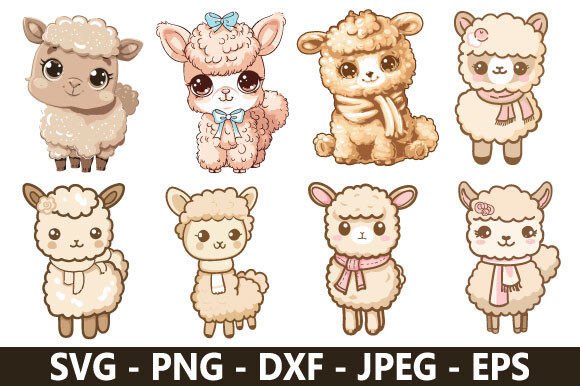
The charm of alpaca-themed crafts has created a significant demand for high-quality digital assets, making a Cute Alpaca SVG Bundle a popular choice for creators across various platforms. Whether you are designing custom apparel for a farm visit, creating nursery decor, or producing merchandise for an online shop, these vector files offer versatility and scalability that raster images simply cannot match. However, the enthusiasm for these adorable designs often leads to rushed purchasing decisions and technical oversights. Understanding the nuances of vector graphics and licensing is essential to ensure your investment translates into professional, durable, and legally compliant finished products.
Evaluating File Integrity Beyond the Preview Image
One of the most frequent mistakes buyers make is judging a bundle solely by its marketing mockups rather than the actual file structure. A polished preview image does not guarantee a clean cut path. Many affordable or free bundles contain auto-traced vectors that look acceptable on screen but result in jagged edges, excessive nodes, and frustrating weeding experiences when sent to a cutting machine. Auto-tracing converts pixels to vectors without understanding geometry, often leaving behind tiny artifacts and overlapping lines that confuse blade software.
To avoid wasting vinyl and time, always verify that the SVGs are hand-drawn or professionally digitized. Before purchasing, check if the seller provides a sample file or detailed zoom-ins of the node structure. If you have already purchased a bundle and suspect quality issues, open the file in vector editing software like Adobe Illustrator, Inkscape, or Affinity Designer before importing it into Cricut Design Space or Silhouette Studio. Use the "simplify" or "optimize" function to reduce node count. A well-designed alpaca illustration should have smooth curves with minimal anchor points. If the design looks blocky or pixelated when zoomed in at 400%, it is likely a poor trace that will yield subpar physical results.
Navigating Licensing for Commercial vs. Personal Use
Misunderstanding licensing terms is perhaps the most critical error when acquiring a Cute Alpaca SVG Bundle for business purposes. Many crafters assume that buying a digital download grants unlimited commercial rights, but this is rarely the case. Licenses vary significantly between designers; some allow for unlimited physical product sales, while others cap usage at 500 units or prohibit print-on-demand services entirely. Ignoring these distinctions can lead to copyright infringement claims, shop takedowns, or legal disputes.
Always read the specific license agreement included in the zip file or listed on the product page. Look for clear language regarding:
- Physical Product Limits: Check if there is a cap on how many items you can sell using the design.
- Digital Redistribution: Never resell, share, or include the raw SVG file in your own digital products. This is almost universally prohibited.
- Print-on-Demand (POD):strong> Many independent artists exclude POD platforms because they cannot track sales volume. Verify this explicitly before uploading to sites like Redbubble or Merch by Amazon.
- Attribution Requirements: Some licenses require you to credit the designer on social media or product tags.
If your intended use falls outside the standard license, contact the designer directly to negotiate an extended commercial license. Most independent creators are happy to accommodate legitimate businesses when approached respectfully.
Technical Compatibility and Layer Management
Frustration often arises when a downloaded alpaca design does not behave as expected in cutting software. This usually stems from compatibility issues or improper layer management. Not all SVG files are created equal; some are optimized for web browsers rather than cutting machines. Web-optimized SVGs may lack the necessary grouping and layering that allows you to change colors individually or perform weld operations without losing detail.
Before committing to a large bundle, test a single design in your specific workflow. Import the file and check if each color element is on a separate layer. If the entire alpaca arrives as one flattened shape, you will be unable to customize colors or use the "attach" function properly for multi-layer projects. Additionally, ensure the file uses standard SVG coding. Some design programs export proprietary SVG variations that Cricut or Silhouette software cannot parse correctly, resulting in missing elements or distorted proportions. If you encounter this, try converting the file through a free online converter or opening it in Inkscape to re-save as a plain SVG. This extra step resolves the majority of import errors and ensures your cute alpaca retains its intended proportions.
Material Selection and Design Complexity
A common oversight is pairing intricate alpaca illustrations with inappropriate materials. Alpacas are naturally fluffy, and designers often capture this texture with fine details, thin lines, and small interior cuts. While these details look beautiful digitally, they can be disastrous when cut from glitter cardstock, flocked heat transfer vinyl, or adhesive vinyl with weak tack. The material’s thickness and adhesive properties must align with the design’s complexity.
For highly detailed alpaca bundles, opt for smooth, premium vinyl or cardstock that holds intricate cuts well. If you plan to use textured materials, choose simplified silhouette versions of the designs if available within the bundle. Alternatively, modify the design yourself by adding a slight offset or backing layer to provide structural support for fragile elements. Testing on scrap material is non-negotiable. A design that weeds perfectly on matte vinyl might tear apart on glitter vinyl due to the increased resistance during the weeding process. Matching the design complexity to your material capabilities prevents wasted supplies and ensures a professional finish.
Assessing Value and Bundle Composition
Finally, evaluate whether the bundle actually serves your needs or simply offers a low price per design. A massive collection of 200 alpaca SVGs seems like excellent value until you realize 180 of them are minor variations of the same pose or style that doesn't match your brand aesthetic. Quantity does not equal utility. A smaller, curated bundle of versatile, high-quality designs often provides better ROI than a sprawling collection of inconsistent artwork.
Consider the cohesiveness of the art style across the bundle. If you are building a product line or a themed event, consistent line weight, proportion, and artistic voice are crucial. Mixing disparate styles can make your work look disjointed and unprofessional. Review the full catalog listing before buying to ensure the designs complement each other and align with your project goals. Investing slightly more in a cohesive, technically sound collection saves money in the long run by reducing failed projects and ensuring every asset in your library is genuinely usable.