Adorable Bat SVG Bundle: A Practical Guide to Avoiding Common Crafting Mistakes
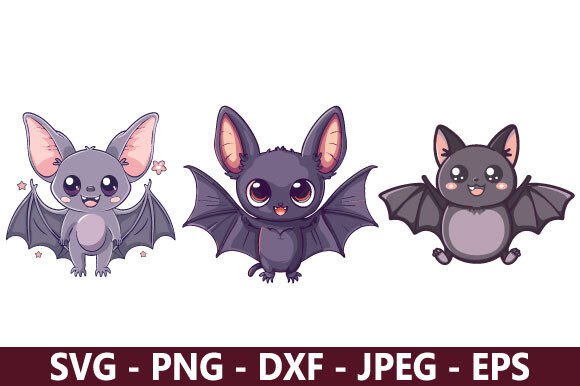
The appeal of the Adorable Bat SVG Bundle lies in its ability to transform a traditionally spooky motif into something whimsical, marketable, and seasonally versatile. For crafters, small business owners, and hobbyists, this type of digital asset offers a shortcut to professional-looking designs for Halloween merchandise, autumn decor, or gothic-aesthetic apparel. However, the difference between a frustrating project and a polished final product often comes down to how you evaluate and utilize these vector files before you ever hit the "cut" or "print" button. Many creators rush into using cute bat graphics only to encounter weeding nightmares, licensing issues, or poor print quality. Understanding the technical and practical nuances of this bundle ensures your time and material investment yields the best possible results.
Evaluating Vector Quality Beyond the Preview Image
One of the most frequent oversights when acquiring any digital design package, including the Adorable Bat SVG Bundle, is judging usability solely by the thumbnail or marketing mockup. A rendering can look crisp on a screen while hiding significant structural flaws that only appear during production. Before committing to a large batch of shirts or decals, you must inspect the actual vector nodes.
Poorly digitized bat wings often contain overlapping paths or unclosed shapes. In vinyl cutting, an unclosed path causes the blade to drag through the material unpredictably, ruining both the decal and potentially your cutting mat. In sublimation or direct-to-garment printing, stray anchor points can create unwanted artifacts or jagged edges that require hours of cleanup in vector editing software. Always open the SVG file in your design program first. Zoom in to 400% and check the wing tips and ear points. If the lines are jittery or the nodes are excessively dense, the file may need simplification. Taking five minutes to smooth out these vectors saves hours of wasted vinyl and frustration later.
The Layering and Color Separation Trap
Cute bat designs frequently rely on multi-color layering to achieve their adorable expression. A common mistake is assuming the bundle’s layers are pre-organized for efficient production. Some designers group elements visually rather than functionally. You might find that the eyes, mouth, and body are merged into a single layer, making it impossible to cut them from different colored vinyls without duplicating and modifying the file manually.
Before purchasing or using the Adorable Bat SVG Bundle for multi-color projects, verify that each color element exists on a separate, clearly labeled layer. If you plan to use heat transfer vinyl (HTV), ensure there are adequate registration marks or alignment guides included. Without these, aligning tiny facial features on a dark bat body becomes a guessing game. A better approach is to test-cut a single-layer version first to confirm sizing and proportion, then proceed to the full-color assembly only after verifying the base dimensions work with your specific garment or substrate.
Navigating Licensing for Commercial Creators
For entrepreneurs and freelancers, the legal scope of the Adorable Bat SVG Bundle is just as critical as its aesthetic quality. Misunderstanding license terms is a pervasive issue that can lead to platform takedowns or legal disputes. Many crafters assume that buying a bundle grants unlimited commercial rights, but licenses vary significantly between designers.
Check specifically for production caps. Some personal-use licenses prohibit selling finished goods entirely, while commercial licenses may limit sales to 500 units per design. Others restrict usage to physical products only, explicitly forbidding digital redistribution or print-on-demand integration. If you intend to sell bat-themed tumblers on Etsy or use the graphics in a Canva template for client work, confirm those specific use cases are permitted. Documenting your license receipt and keeping a record of which designs are cleared for commercial use protects your business as you scale. Never assume; always read the included PDF license file or the product description’s fine print.
File Format Compatibility Issues
Not all SVG files are created equal, and compatibility varies between Cricut Design Space, Silhouette Studio, Adobe Illustrator, and embroidery digitizing software. A recurring pain point with bat bundles involves files that import at incorrect sizes or with distorted proportions. This often happens when the SVG lacks proper viewBox metadata or was saved from incompatible software.
To avoid resizing errors that distort your adorable bat into an unrecognizable blob, establish a standardized workflow. Import the file into your primary software at 100% scale and measure a known dimension against the original specs. If the bundle includes DXF or EPS alternatives, test those as well; sometimes a DXF cuts cleaner in Silhouette Studio than the SVG counterpart. Keeping a master copy of the original, unmodified files in a dedicated folder prevents accidental overwrites and gives you a clean baseline if you need to troubleshoot formatting issues later.
Design Application and Material Considerations
The intricate details that make bat designs adorable—tiny teeth, delicate wing veins, expressive eyes—are also their vulnerability during application. Selecting the wrong material or application method for these fine details leads to peeling, cracking, or incomplete transfers. This isn’t a flaw in the Adorable Bat SVG Bundle itself, but rather a mismatch between design complexity and execution strategy.
For HTV applications on textured fabrics like canvas or burlap, highly detailed bat faces may not adhere properly. In these cases, consider using the bundle’s simplified silhouette versions instead, or switch to sublimation which captures detail without relying on adhesive bonding. When working with adhesive vinyl for car decals or outdoor signs, remember that thin wing tips are prone to lifting. Applying a laminate overlay or choosing a thicker, more durable vinyl grade extends the lifespan of intricate designs. Testing on scrap material that matches your final substrate’s texture and coating is non-negotiable for professional results.
Seasonal Versatility and Market Saturation
While bats are inherently linked to Halloween, limiting the Adorable Bat SVG Bundle to October-only products leaves revenue on the table. A strategic mistake many sellers make is failing to adapt these designs for year-round niches. Gothic aesthetics, wildlife education, cave conservation fundraising, and fantasy gaming communities embrace bat imagery regardless of season.
Consider how minor modifications can extend the bundle’s utility. Adding floral elements transforms a Halloween bat into spring cottagecore decor. Pairing silhouettes with scientific names appeals to educators and nature enthusiasts. Integrating bats into reading-themed designs ("Book Bats") targets librarians and literacy advocates. By viewing the bundle as a foundational asset rather than a seasonal novelty, you maximize return on investment and differentiate your offerings in saturated Halloween markets. Always cross-reference trending search terms with the bundle’s adaptable elements to identify underserved niches where cute bat graphics resonate beyond traditional holiday boundaries.